Stop Managing Vendor
Payments in Two Systems
The Odoo Bill.com Integration connects your AP workflow end-to-end
— export bills, submit payments, and sync payment status without
ever leaving Odoo.
If your team users Bill.com for payments and Odoo as your ERP, you already know the
problem: data gets entered twice, payment statuses go stale, and your AP team switches
between systems all day. This integration eliminates that friction.
FEATURES
Everything your AP team needs, connected.
One integration covers the full accounts payable lifecycle - from vendor
setup to payment confirmation.
🔄
Vendor & Chart of Accounts Sync
Import your Bill.com vendors and accounts into Odoo with automated name matching. Map to existing records or create new ones in a single click.
📤
Bill Export to Bill.com
Export posted vendor bills from Odoo to Bill.com individually or in bulk. Line items are automatically aggregated by account — no manual reformatting required.
💳
Flexible Payment Submission
Submit payments immediately, schedule them for a future date, or group multiple bills from the same vendor into a single payment — all from the Odoo payment wizard.
📊
Automatic Payment Status Sync
A configurable scheduled job polls Bill.com for payment status updates and writes them back to Odoo automatically. No more manually checking if a bill was paid.
🌍
Multi-Currency Support
For foreign-currency bills, the integration retrieves a live exchange rate from Bill.com at payment time and applies it to that bill only — without affecting your global Odoo rates.
⚡
Partial Payment Support
When a bill has already had a partial payment applied, the payment wizard automatically pre-fills the remaining outstanding balance so your team never overpays.
HOW IT WORKS
From bill to payment in four steps
A simple, guided setup gets you connected in minutes - then everything
runs automatically
Configure the Connection
Set up the Odoo Bill.com Bridge with your API credentials, organization key, and MFA validation. A built-in connection test confirms everything is working before you go live.
Import & Map Your Data
Pull your existing Bill.com vendors and chart of accounts into Odoo. Auto-matching handles most records — manually map any exceptions from a clean list view.
Export Bills & Submit Payments
Post a vendor bill in Odoo and click "Register in Bill.com." Choose to create the bill only, submit for immediate payment, or schedule it for a future date.
Stay in Sync Automatically
The payment status sync job runs daily and updates bill statuses in Odoo as payments clear in Bill.com. The Sync Dashboard gives your team a real-time view of every operation.
PAYMENT OPTIONS
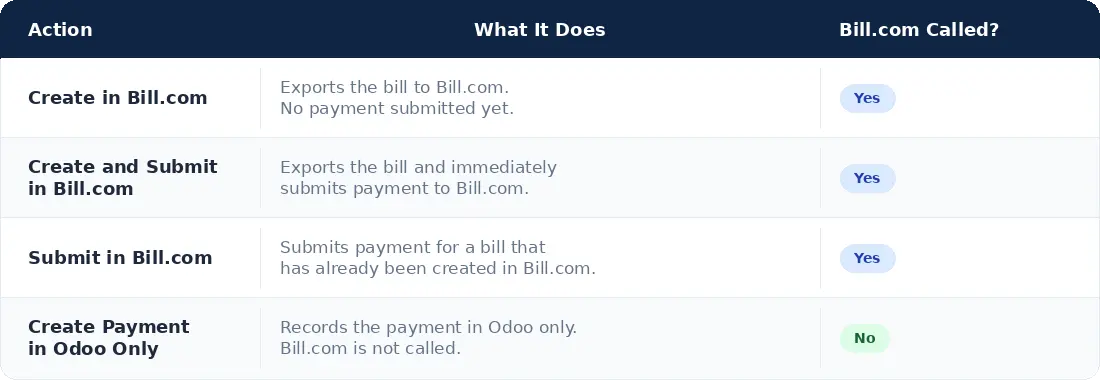
Every payment scenario, covered.
Choose how each bill gets paid directly from the Odoo payment wizard.
FAQ
Common Questions
No. The integration works alongside Odoo's standard accounting module. Vendor bills, journal entries, and reconciliation all continue to work exactly as they do today.
Bank account and credit card payments are supported. The system automatically selects the primary active account from Bill.com for the selected payment type.
MFA is required for payment submission to Bill.com — this is a Bill.com security requirement. The Bridge includes a built-in MFA validation workflow that takes less than a minute. MFA re-validates daily.
Yes. A credential neutralization script is included that clears all API credentials from a restored database before startup, preventing any accidental API calls against your production Bill.com account.
Ready to connect Odoo and Bill.com?
Contact S4 Solutions to get started with Bill.com
Integration today.