When a Sales Order comes in for 47 units and your line runs best at batches of 10, you shouldn't
need to manually create 5 Manufacturing Orders. This module does it for you — automatically.
FEATURES
Smarter manufacturing, fewer manual steps
Manufacturing Lot Sizes adds one simple setting to your products that changes how Odoo generates Manufacturing Orders — automatically and at every level of your BOM.
⚙️
One Setting Per Product
Add a Lot Size directly on the product's Inventory tab. It only appears when the product uses the Manufacture route — no clutter for products that don't need it.
⚡
Automatic MO Splitting
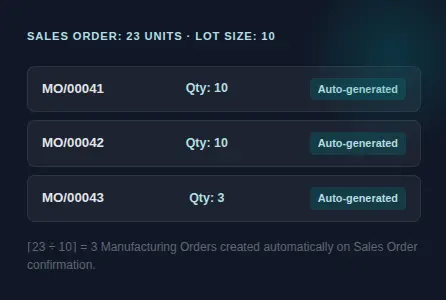
When a Sales Order is confirmed, the system instantly calculates the number of MOs needed and creates them — each at the right quantity, with the correct remainder on the last one.
🌲
Works at Every BOM Level
Child components that have their own Lot Size are split independently. Production runs are controlled consistently from finished goods all the way down to sub-assemblies.
🗨️
Manual Override Option
When a user manually creates an MO that exceeds the Lot Size, a simple dialog asks whether to split or proceed as-is. Your team stays in control when they need to be.
🔒
Non-Disruptive
Products without a Lot Size behave exactly as they do today. This module adds capability without changing anything about your existing workflow.
📐
Precise Remainder Handling
The final MO in a split batch is always created with the exact remaining quantity — no over-production, no short-shipments, no manual corrections needed.
HOW IT WORKS
Demand comes in. MOs go out.
Set a Lot Size of 10 on a product. A Sales Order arrives for 23 units. Instead of one MO for 23, the system creates three Manufacturing Orders — two for 10 and one for 3 — all linked to the same demand.
No manual splitting. No extra steps. Your production team gets clean, right-sized work orders they can start immediately.
The same logic applies when a parent MO needs a component that has its own Lot Size — each level of the BOM is handled independently and correctly.
MANUAL MO CREATION
Your team always has the final say
Sometimes your team needs to create a Manufacturing Order directly — not from a Sales Order. When they enter a quantity that exceeds the Lot Size, a clear dialog appears asking whether to split or proceed with a single MO.
There's no guessing and no hidden behavior. Choose to split and the system handles everything. Choose to continue and Odoo behaves exactly as it normally would.
QUICK REFERENCEE
See the math in action
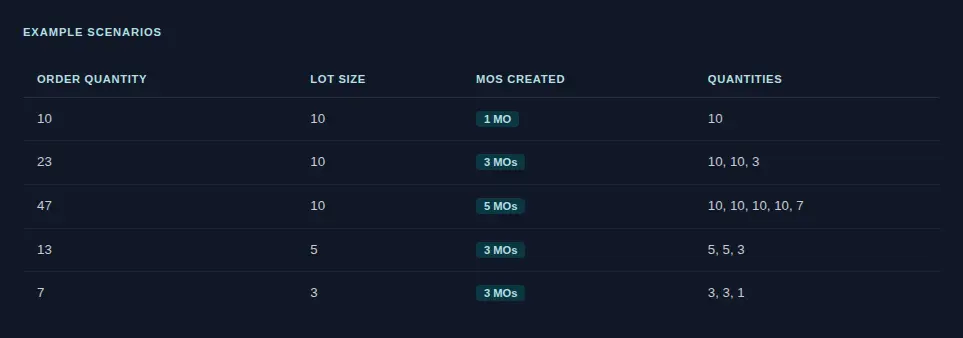
The number of MOs is always calculated as ⌈ Demand ÷ Lot Size ⌉ — the last MO always carries the exact remainder.
Ready to simplify your production runs?
Add Manufacturing Lot Sizes to your Odoo environment
today and start generating the right MOs automatically.