The Challenge
For electronics manufacturers and distributors who source components from DigiKey, keeping purchase order pricing accurate is a constant battle. DigiKey prices fluctuate regularly, and bulk pricing tiers mean the right quantity can significantly reduce cost — but only if procurement teams know what those thresholds are at the time of ordering.
A manufacturer sourcing electronic components through DigiKey was managing this entirely by hand. Before raising a purchase order in Odoo, procurement staff would open DigiKey's website, search for each part number, check the current price, note any quantity break thresholds, and manually enter the pricing into the purchase order. On orders with multiple line items, this process consumed significant time for every single order.
The manual process created a cascade of problems:
- Prices checked earlier in the day were often outdated by the time the order was placed — DigiKey pricing updates frequently
- Bulk pricing tiers were missed when quantities were close to a threshold but the team wasn't aware of the break point
- Transcription errors introduced incorrect unit prices into Odoo, affecting financial planning and budget accuracy
- Procurement staff spent a significant portion of their day on repetitive manual price lookups instead of strategic purchasing work
- There was no reliable way to verify that the price on a purchase order reflected what DigiKey would actually charge at that quantity
The team needed pricing to be accurate, automatic, and always current — without adding steps to their purchasing workflow.
The Solution: Real-Time DigiKey Pricing Inside Odoo
S4 Solutions developed a custom DigiKey Connector for Odoo that pulls live pricing data from DigiKey's API at the moment a purchase order line is created or updated. The price your team sees on the Odoo PO is the price DigiKey would charge today — including any bulk discount that applies to the quantity being ordered.
Real-Time Pricing Updates
When a product linked to a DigiKey part number is added to a purchase order, the connector automatically fetches the current DigiKey price and populates the unit cost on the order line. No manual lookup, no browser tab switching, no transcription — the price is always current.
Automatic Bulk Pricing Adjustments
DigiKey's pricing tiers reward larger order quantities with lower unit costs. The connector retrieves the full pricing tier structure for each part and automatically applies the correct tier based on the quantity being ordered. If a buyer increases the quantity on a line, the price adjusts accordingly to reflect the new tier.
Native Odoo Integration
The connector works within Odoo's standard purchasing workflow — no new screens, no separate application, no training required. Buyers create and manage purchase orders exactly as they always have. The DigiKey pricing updates happen automatically in the background.
Non-Disruptive Setup
The integration works alongside existing Odoo Vendor Pricelists and Purchasing modules. Products are mapped to their DigiKey part numbers once during setup, and from that point on pricing is handled automatically on every order.
Before & After
Here's how the procurement process changed after implementing the DigiKey Integration:
❌ Before — Manual Price Lookups
- Open DigiKey website, search each part number, and manually copy the price into Odoo for every PO line
- Bulk pricing tiers frequently missed — team unaware of thresholds without checking manually
- Prices checked early in the workflow were stale by the time the order was placed
- Transcription errors introduced incorrect unit prices into purchase orders
- Procurement staff spent hours per week on repetitive price lookups
- No way to verify at a glance that PO pricing matched current DigiKey rates
✅After — Automatic Live Pricing
- DigiKey price populated automatically when a product is added to a purchase order — no manual lookup
- Full bulk pricing tier structure retrieved and applied automatically based on order quantity
- Pricing always reflects current DigiKey rates at the moment the order is created
- No transcription step — pricing flows directly from DigiKey's API into the Odoo PO line
- Procurement team freed from repetitive price checks to focus on strategic purchasing decisions
- Every PO line reflects what DigiKey would actually charge for that part at that quantity — verified automatically
How It Works in Practice
Bulk Pricing Tiers from DigiKey
When a buyer opens a purchase order and adds a DigiKey-linked product, the connector retrieves the current pricing tier structure for that part number. All available quantity breaks and their corresponding unit prices are visible directly within Odoo — no need to open DigiKey's website to understand what discount applies at different order volumes.
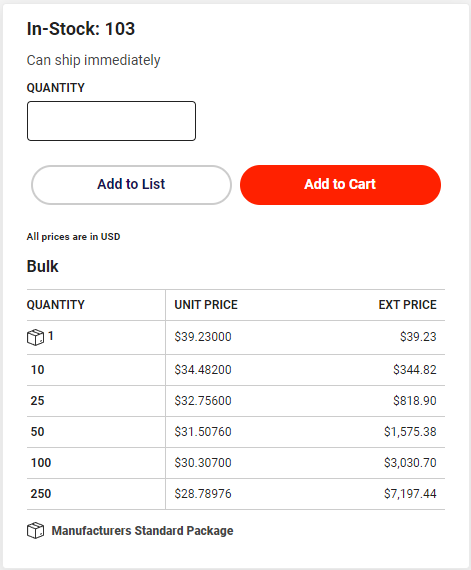
DigiKey's full bulk pricing tier structure is retrieved and displayed directly within Odoo — buyers can see every quantity break and its corresponding unit price without leaving their purchasing workflow.
Live Pricing on the Purchase Order
The purchase order line reflects the current DigiKey price for the quantity being ordered. If the buyer adjusts the quantity to cross a pricing tier threshold, the unit price updates automatically to reflect the better rate. What the team sees on the Odoo PO is exactly what DigiKey would charge — no manual verification required.
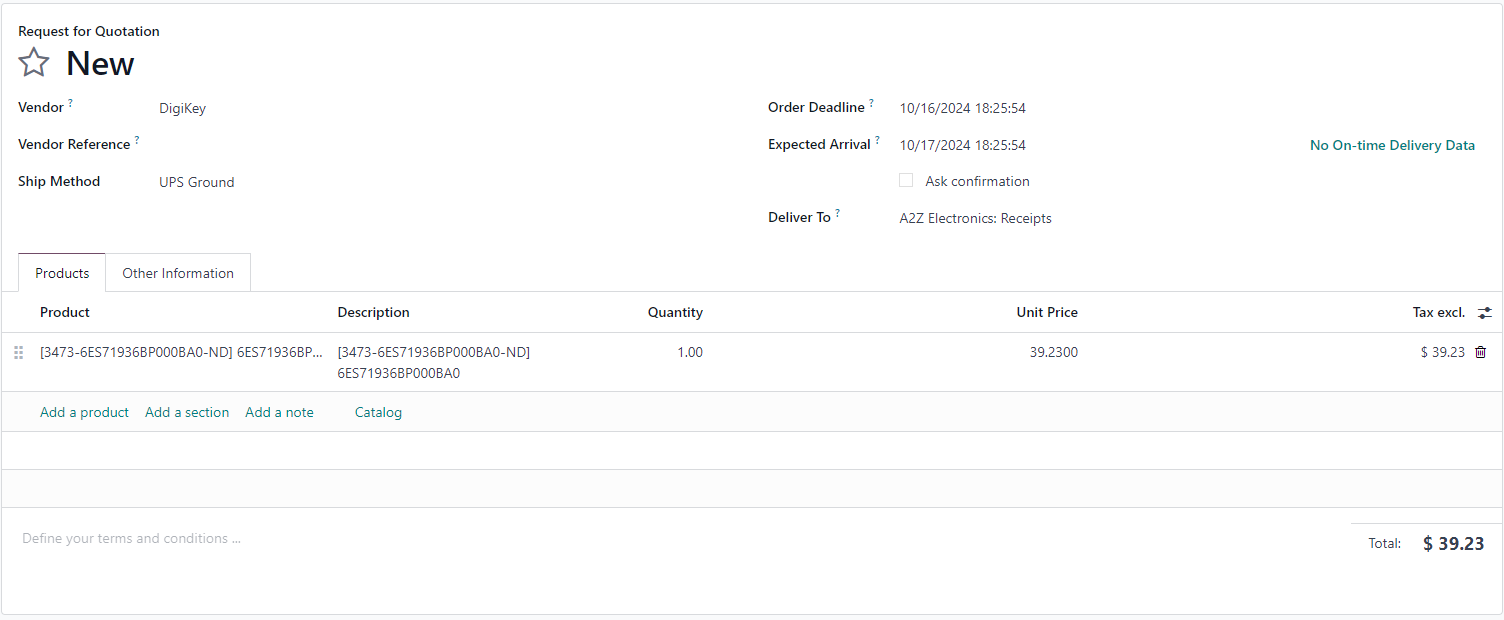
The Odoo purchase order line is automatically populated with the current DigiKey unit price for the selected quantity. Pricing is live — reflecting what DigiKey charges at the moment the order is created.
Quantity Adjustments and Tier Updates
When buyers increase order quantities to take advantage of bulk pricing, the connector recalculates the applicable tier and updates the unit price on the line. This makes it easy to identify situations where ordering slightly more units results in a meaningfully lower unit cost — without any manual calculation.
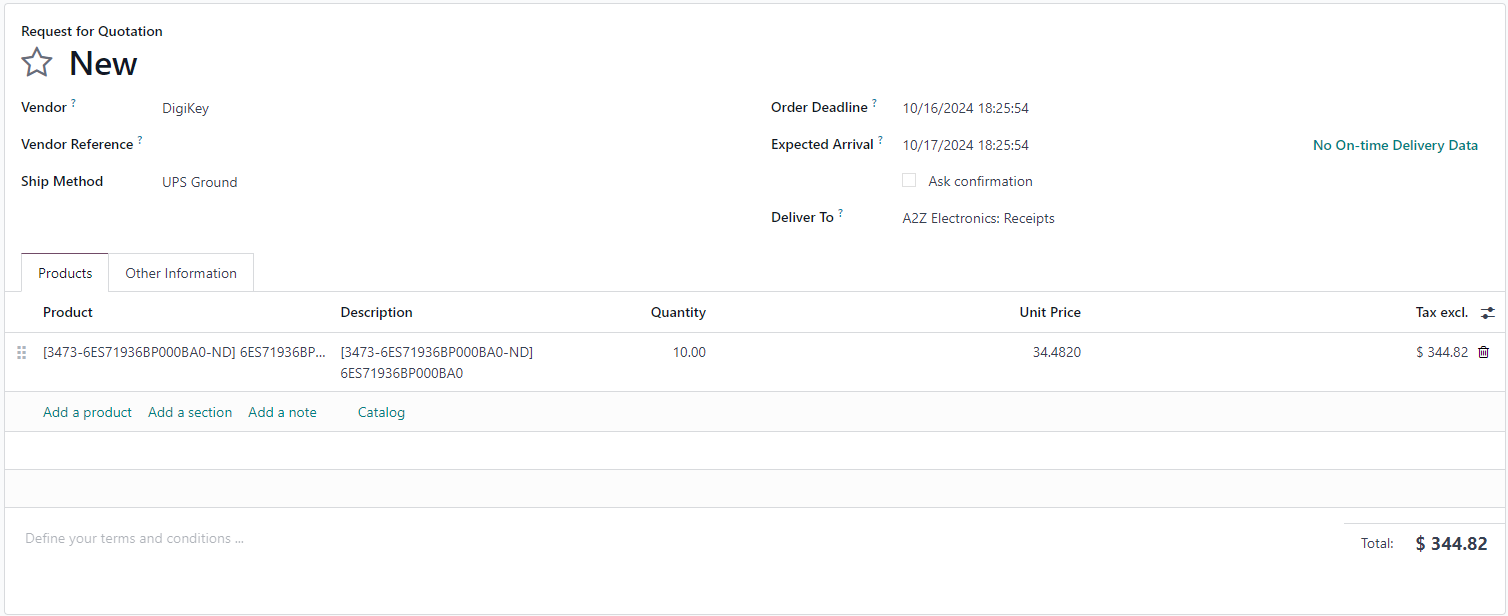
Adjusting the order quantity automatically recalculates the applicable DigiKey pricing tier — making it easy to identify when ordering more units results in a lower unit cost.
The Impact
Eliminated Pricing Errors
By removing the manual transcription step entirely, the integration eliminated the category of errors that came from copying prices from DigiKey's website into Odoo. Every purchase order reflects what DigiKey's API returns — not what a team member typed in.
Bulk Discounts Captured on Every Order
With full pricing tier visibility inside Odoo, buyers can see at a glance whether increasing an order quantity would unlock a lower unit price. Volume discounts that were previously missed because the team didn't know the threshold are now applied automatically.
Always-Current Pricing
Because the connector fetches pricing at the time the order is created — not when someone last checked manually — every purchase order reflects current market conditions. The gap between "when we checked" and "when we ordered" is eliminated.
Procurement Team Time Reclaimed
The hours previously spent on repetitive manual price lookups across multiple line items are now available for strategic purchasing work — supplier relationship management, spend analysis, and demand planning.
Improved Financial Accuracy
With purchase order costs reflecting actual DigiKey pricing rather than manually entered estimates, financial planning and budget tracking became more reliable. Landed cost variance between PO and invoice narrowed significantly.
No Workflow Disruption
The integration works invisibly within the existing Odoo purchasing workflow. No new screens, no new processes, no retraining — procurement staff adopted it immediately because their workflow didn't change.
Is This Right for Your Operation?
The DigiKey Integration is a strong fit for procurement teams that:
- Source electronic components from DigiKey as part of their regular purchasing workflow
- Manage purchase orders with multiple DigiKey line items per order
- Want to capture bulk pricing discounts without manual threshold monitoring
- Are experiencing pricing errors or discrepancies between PO costs and actual invoices
- Want to reduce the time procurement staff spend on repetitive manual tasks
It works particularly well for:
- Electronics manufacturers sourcing components for production BOMs
- Contract manufacturers managing component procurement across multiple customer programs
- Distributors who frequently re-order DigiKey products and need current pricing at point of order
- Any Odoo purchasing team where DigiKey is a primary or high-volume supplier
Getting Started
- Install the Module — Add the DigiKey Integration to your Odoo environment through the Apps menu
- Connect Your DigiKey Account — Enter your DigiKey API credentials in the integration settings — a one-time configuration
- Map Your Products — Link your Odoo products to their corresponding DigiKey part numbers
- Start Purchasing with Live Pricing — Create purchase orders as normal — pricing updates automatically on every order
Contact us at info@sfour.io to discuss how a custom quoting solution could transform your sales process.
Looking for other Odoo solutions? Check out our All Apps page to see our full range of modules.