The Challenge
A manufacturing company running Odoo faced a daily frustration familiar to many inventory teams: finding the right transfer record at the right time.
Inventory Associates responsible for processing both incoming purchase receipts and subsequent putaway transfers had no fast way to move between related records. When a Purchase Order arrived and was received at the dock, the team had to:
- Navigate to a separate list of operation types to find the associated Internal Transfer
- Apply manual filters or scroll through long lists of transactions to identify which putaway corresponded to which receipt
- Repeat the same search in reverse when working from the Internal Transfer back to the originating PO
- Manually trace whether received products had been located in the warehouse for a given PO receipt
The same problem existed on the outbound side. Warehouse staff processing Pick, Pack, and Ship operations had no direct link between those three records, requiring constant list navigation to confirm the status of an order moving through fulfillment stages.
The team was spending valuable time on system navigation rather than warehouse operations.
The Solution
The manufacturer partnered with S4 Solutions to build a set of smart button links directly into Odoo's Purchase Order, Receipt, Internal Transfer, and outbound delivery workflows.
One-Click Navigation Between Related Records
Smart buttons on every relevant form view allow users to jump directly between the Purchase Order, Receipt, and Putaway transfer — or between the Sales Order, Pick, Pack, and Ship — without ever leaving the record they are working on.
Automatic Record Counts
Each smart button displays the number of associated records (e.g., "2 Receipts" or "1 Putaway"), giving users an immediate picture of what has been created without running a search.
Intelligent Visibility
Smart buttons only appear when associated records actually exist. An Internal Transfer created manually to move product between locations — with no connection to a Purchase Order — shows no purchase or receipt buttons, keeping the interface clean and relevant.
Full Inbound and Outbound Coverage
The solution links all three inbound objects (Purchase Order → Receipt → Putaway) and all three outbound objects (Sales Order → Pick → Pack → Ship) with bidirectional navigation throughout.
How It Works in Practice
Inbound — Receiving and Putaway
When an Inventory Associate opens a Purchase Order, two smart buttons are immediately visible: one for the associated Receipt and one for the Putaway transfer. A single click takes them directly to either record.
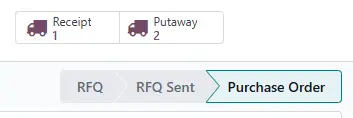
The Purchase Order form view — "Receipt" navigates back to the originating PO, while "Putaway" links forward to the internal transfer.
When working from the Receipt, the same associate can navigate to the originating Purchase Order or jump forward to the Putaway transfer that followed.
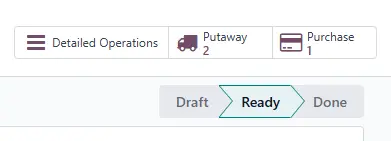
The Receipt form view — "Purchases" navigates back to the originating PO, while "Putaway" links forward to the internal transfer.
When only one record exists, Odoo opens the form view directly. When multiple records exist — such as a PO with several receipts — Odoo opens a pre-filtered list showing only the relevant records.
Outbound — Pick, Pack and Ship
On the outbound side, warehouse staff processing a Pick transfer can see immediately which Sales Order originated the work and which Pack transfer follows. Pack operators can navigate back to Pick or forward to the Delivery Order. At every stage, the full chain of the outbound fulfillment is one click away.
The Impact
Faster Warehouse Operations
Inventory Associates no longer switch between lists and apply manual filters to find related transfers. Navigation that previously took several minutes now takes a single click.
Better Receiving Visibility
Managers and associates can confirm at a glance whether products received against a PO have been located in the warehouse, without leaving the Purchase Order record.
Cleaner Interface
Because smart buttons only appear when associated records exist, the form views remain uncluttered for transfers that stand alone — such as manual inventory moves between locations.
End-to-End Fulfillment Clarity
Outbound teams processing Pick, Pack, and Ship operations now have full visibility into where an order stands in the fulfillment chain at every stage, reducing miscommunication between warehouse zones.
No Training Required
The smart buttons follow Odoo's native UI patterns, meaning warehouse staff familiar with Odoo understood the feature immediately with no formal training needed.
Scalable to Any Workflow
The linking logic is built to be extensible — additional operation types can be connected using the same pattern as the business grows.
Is This Right for Your Operation?
Linked Warehouse Transactions may be a good fit if your team experiences:
- Time lost navigating between Purchase Orders, Receipts, and Internal Transfers
- Difficulty confirming whether received products have been put away
- Outbound teams manually tracing Pick, Pack, and Ship records
- A growing transaction volume making list navigation increasingly slow
- A need for better real-time visibility across receiving and fulfillment workflows
Contact us at info@sfour.io to discuss how forward-flushing could improve inventory accuracy and production visibility in your Odoo environment.
Looking for other Odoo solutions? Check out our All Apps page to see our full range of modules.